Tempo tells you the pace of a song. Gender tells you whether the vocalist is male or female. But neither one tells you whether a track opens with a guitar riff, builds around a piano, or has that compressed, in-your-face sound that works for certain dayparts and not others. Sound codes fill that gap. They're custom labels you define for your station, and you can use them to manage variety in ways the standard attributes can't cover on their own.
Creating sound codes
Sound codes are specific to your station. The list is yours to define based on whatever characteristics matter for your format.
The easiest way to create a sound code is directly from the song library. Open any song's settings, find the Sound codes field, and start typing. If no existing code matches, you'll see an option to create it inline. Pick a name and assign a color so it's easy to spot in the media list.
Once created, a sound code is available across every song on that station.
Assigning sound codes to songs
Open a song's settings, find the Sound codes field, and select from the list. Each song can carry multiple codes. A song that's guitar-driven and high-energy can have both attributes tagged at once.
When the Sound codes column is enabled in the category media list, assigned codes appear as colored badges next to each song.
Sound codes can also be added in bulk by selecting songs from the list and using the bulk actions menu bar that appear.
Editing or removing your sound codes
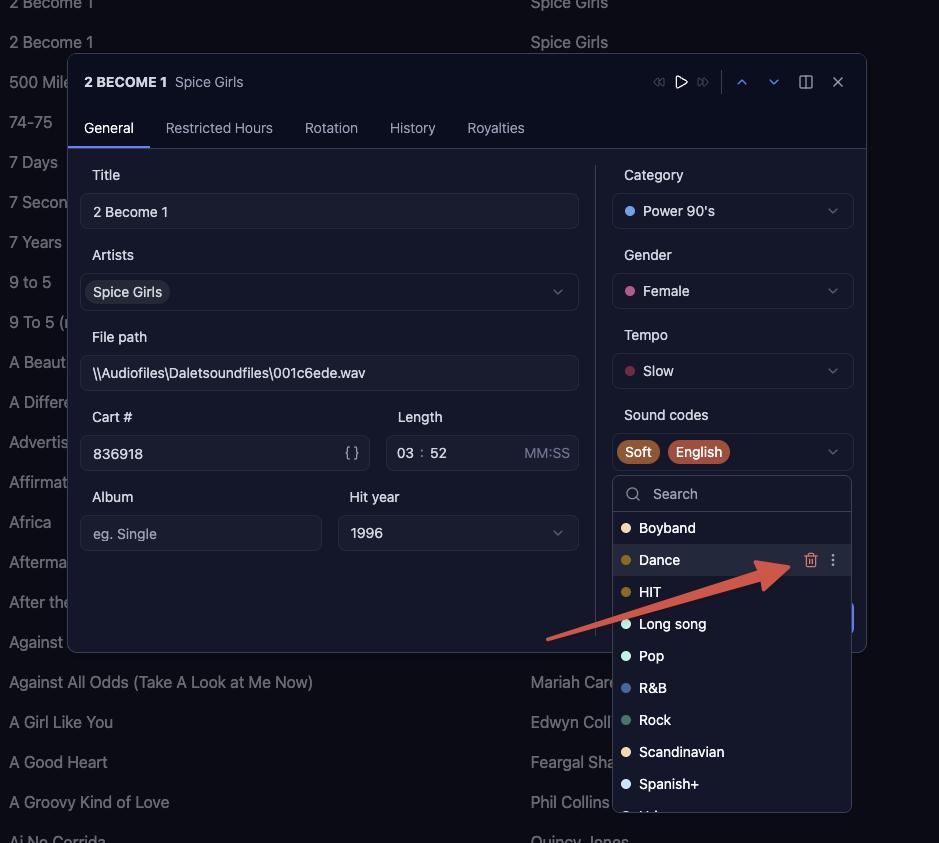
Clicking in the sound code field in the song manager will open a list of all sound codes you have. Hovering over each will show you 2 line icons. One trash bin icon to delete it and a 3-dot icon to open the edit options. Here you can change the name and color of the sound code.
Using sound codes in rules
Sound codes become most useful as the basis for scheduling rules. Four rule types use them.
A Sound Code Separation rule sets the minimum interval before a song with a given sound code can be scheduled again. If you have twelve guitar-driven songs in rotation, this keeps them spread across the hour instead of clustering together.
A Sound Code Run rule sets the maximum number of songs with the same sound code that can play consecutively. This prevents runs of three or four songs with the same sonic character from playing back to back.
A Sound Code Hour Limit rule caps how many times songs with a specific sound code can play within a single hour.
A Sound Code Transition rule specifies which sound code changes between songs are not allowed, giving you control over the flow from one song to the next.
See the Rules articles for how to configure each of these.